WhatsApp for travel agencies: trip inquiries and booking confirmations
Travel agents already run on WhatsApp. Clients send trip requests, agents share itineraries, confirmations happen in chat. Here's how to structure it so nothing gets lost.

If you run a travel agency, WhatsApp is already your CRM. Clients send "hey, planning a trip to Bali for 5 people in June" and the conversation just starts. You share PDFs, photos, hotel options, price lists. It works.
But it gets messy fast. Inquiries get buried in chat threads. You ask the same questions every time. Confirmations happen verbally and then disappear. Someone forgets what they agreed to.
The problem isn't WhatsApp. The problem is that the information is unstructured. Fix that, and WhatsApp becomes the most powerful booking tool you have.
Trip inquiry form
Every booking starts with the same questions. Where do you want to go? When? How many people? What's your budget? Asking these one by one in chat takes forever and you still end up missing something.
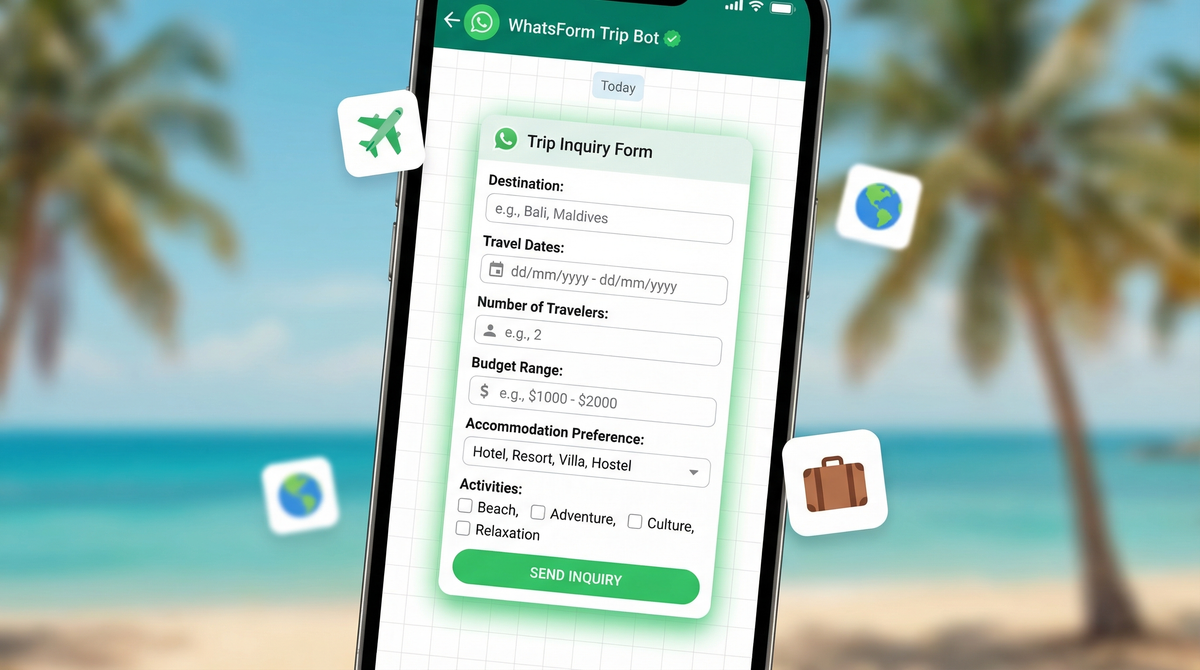
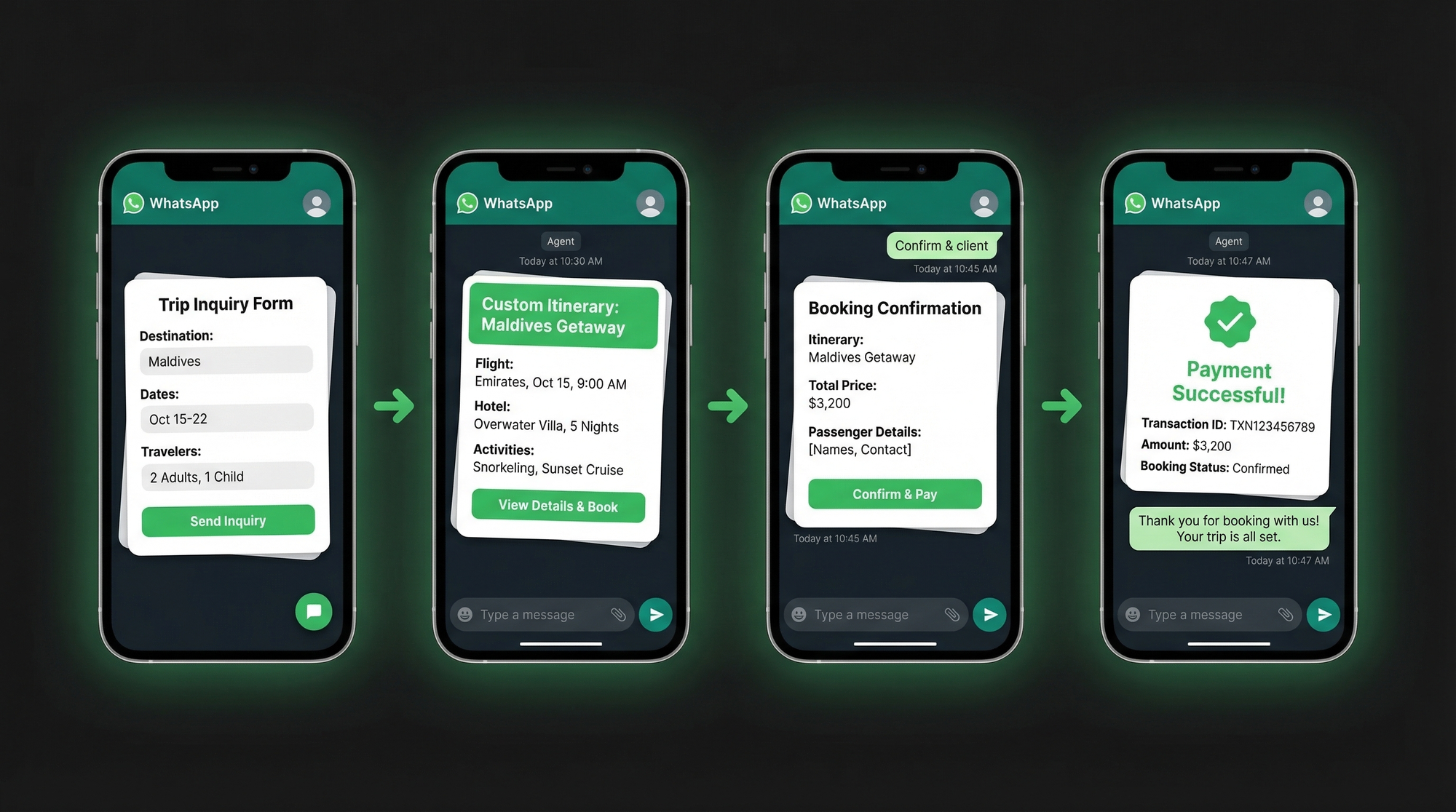
A WhatsApp booking form collects all of it upfront. Destination, travel dates, number of travelers, budget range, accommodation preference (hotel, villa, hostel, resort), and activities they're interested in. The client fills it once and you get everything in a structured message.
No more back-and-forth. No missing fields. No "oh wait, I forgot to ask about the budget."
You can share this form as a link in your WhatsApp bio, pin it in your business profile, or drop it at the start of any new conversation. Check out our guide on WhatsApp lead generation to see how agents use these forms to capture inquiries before the conversation even starts.
Visa and document collection
After the inquiry, most trips need documents. Passport copies, photos, visa application details, travel insurance. Collecting these over chat is a nightmare. Files get scattered. You're asking "can you resend the passport scan?" three days later.
A document collection form fixes this. Passport copy upload, photo upload, visa type needed, travel dates for the visa application, emergency contact. The client uploads everything in one go and it lands in your responses dashboard, organized and ready.
No lost files. No chasing. The entire document package comes through as one structured submission.
If you need the setup steps, our help center guide on storing form responses in Google Sheets is useful here. Travel teams often want every passport upload and trip request mirrored outside WhatsApp.
Custom itinerary sharing
You've built the itinerary. Now you need the client to review it, give feedback, and approve it before you book anything. Sending a PDF and waiting for a "looks good" doesn't cut it when you need specific approval on each leg of the trip.
Share the itinerary via WhatsApp and attach a quick feedback form. Day-by-day review, questions, changes requested, final approval. The client marks which parts they love and which they want adjusted. You get their feedback in a structured format instead of trying to parse three voice notes and two screenshots.
Once they approve, the form captures that confirmation. No ambiguity. No "I thought we said three nights in Rome, not two."
Booking confirmation and payment
This is the step that causes the most problems for travel agents. The client verbally agrees to everything and then two weeks later they remember it differently. Or the payment details get sent in a voice note that nobody can find.
A booking confirmation form solves this completely. Trip details (destination, dates, number of travelers, hotel names), total amount, payment breakdown, payment method, and terms accepted. The client fills it, confirms the details, and accepts the terms in one form submission.
That submission is your paper trail. It timestamps the confirmation, records the agreed amount, and captures their explicit acceptance. For anyone dealing with cancellations or disputes, this is the thing that saves you.
You can even accept payments directly inside the form. WhatsForm supports payment collection, so the confirmation and the deposit happen in the same step. See how it works in our payment collection guide.
Group trip management
Group trips are where WhatsApp gets genuinely chaotic. You're coordinating 12 people, each with different passport details, dietary requirements, room preferences, and emergency contacts. Collecting that over a group chat is a full-time job.
Send each traveler an individual form. Passport number, expiry date, full name as on passport, dietary requirements, room type preference, emergency contact, any medical conditions the guide should know about. Every person fills their own form. Everything lands in your dashboard, traveler by traveler, ready to hand to the hotel and visa team.
No more piecing together details from a 400-message group thread. No more "can everyone please send me their passport details again." One form, one submission per traveler, done.
This is also where articles like WhatsApp registration forms and WhatsApp customer surveys become useful. The first helps you collect traveler details before the trip. The second helps you collect structured feedback after it.
Post-trip feedback
Most travel agents skip this step. That's a mistake. Post-trip feedback is how you improve, and it's also where testimonials come from.
Send a feedback form a few days after the trip. Destination rating, accommodation rating, guide rating, overall experience, what they'd change, would they recommend you to a friend, and space for a testimonial. Keep it short. Five to seven questions maximum.
The responses give you data on which destinations people love, which hotels are causing complaints, and which guides are getting consistent five stars. And the testimonials go straight to your website. WhatsApp contact forms work well here too, for clients who want to reach out directly about future bookings after they've returned.
We go deeper on how to collect leads and feedback through WhatsApp in our post on WhatsApp vs email for lead generation. The short version: WhatsApp wins on open rates, every time.
Setting it up
You don't need a developer. You don't need a CRM. You need WhatsForm, which is what we built for exactly this kind of workflow.
If you are still deciding between a simple form workflow and heavier automation, read WhatsApp Business app vs API. Most travel agencies do not need the API on day one.
Create your trip inquiry form in a few minutes. Add fields for destination, dates, traveler count, budget, accommodation preference, and activities. Share the link with every new inquiry. All responses land in your dashboard, organized by submission.
Use the booking confirmation template as your starting point for the payment confirmation step. It's pre-built for exactly this use case. Customize the fields to match your agency's process, add your payment details, and you're live in under ten minutes.
For a detailed walkthrough, check our help center guide on creating a trip inquiry form.
Full disclosure: we built WhatsForm. It's free to start, and you can see how to create your first form here. If you want the step-by-step instructions, the help center guide on creating your first WhatsApp form walks through it.
Manage everything from the mobile app while you're on the go. Available on Android and iOS. If your agency has a website, the WordPress plugin lets you embed the inquiry form directly on your travel packages page.
Travel agencies that use structured forms on WhatsApp spend less time chasing information and more time actually planning trips. The channel stays the same. The clients stay the same. You just stop losing things in the chat.